Large Render Blocking Asset
A Large Render Blocking Asset issue is created when a big stylesheet or script has to finish loading before the browser can show anything on the page, and it takes up a large share of the wait.
Browsers treat some files as essential to the first view. A stylesheet in the page head, or a script that isn't marked to load later, blocks rendering until it has been downloaded and processed. If that file is small, you never notice. If it is large, your users look at a blank or unfinished page while it loads.
This issue is found in RUM, because it is about what real users see while a page loads.
How Middleware detects it#
Middleware compares how long a file took to load with how long it took for the page to show its first content, a moment known as First Contentful Paint, or FCP. It flags a file when:
- It is a stylesheet or script that the browser treated as blocking, not one that loads in the background.
- It is large.
- It takes up a big share of the time before the first content appears.
What you'll see in Middleware#
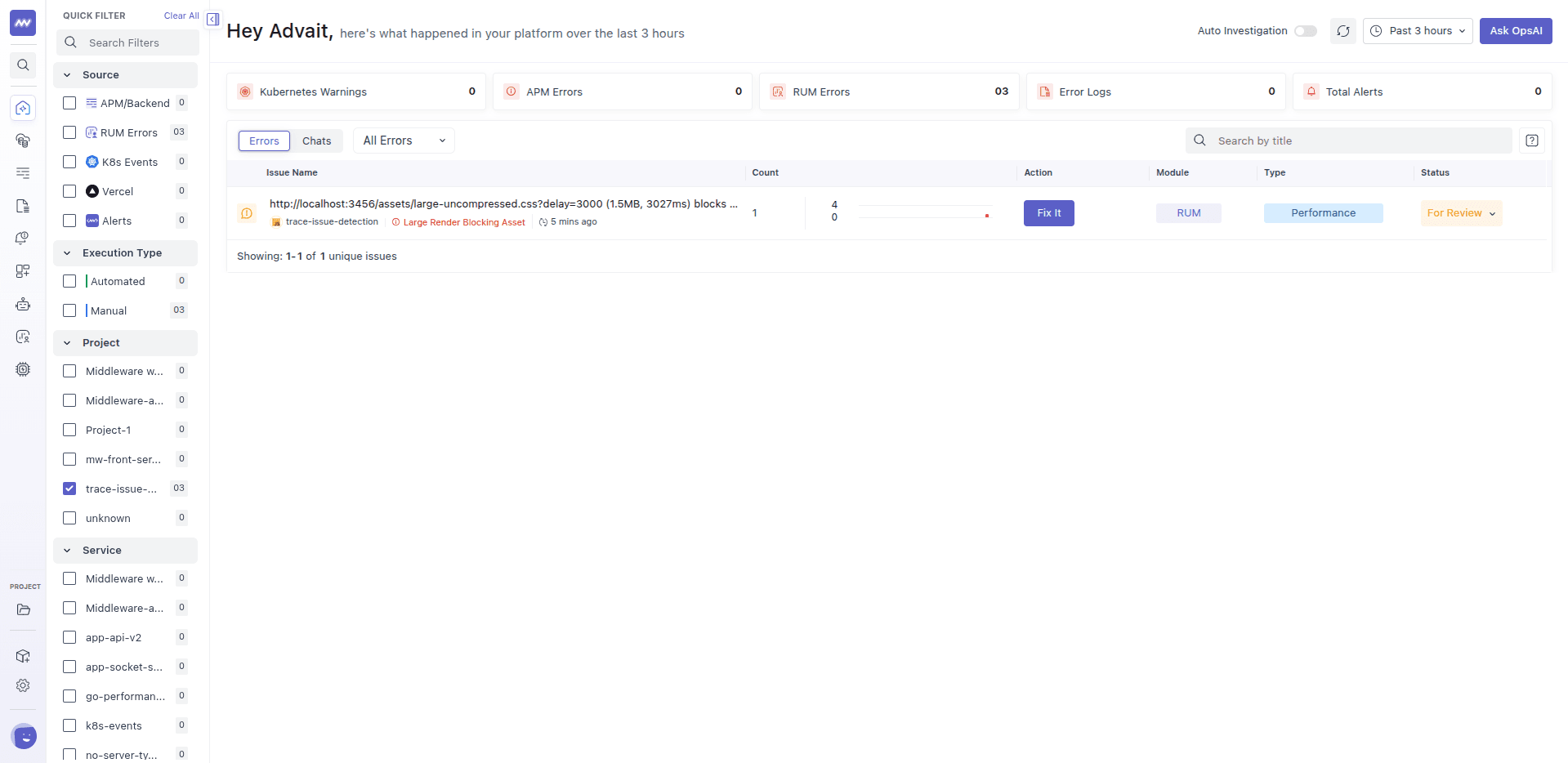
The title is the URL of the asset, followed by its size and load time. Open the issue to see how much of the page's first paint this file accounted for.
Common causes#
- One large stylesheet for the whole site, loaded in the page head even though the first view only uses a small part of it.
- A large script loaded synchronously near the top of the page.
- Bundles that include more than the page needs, such as code for pages the user hasn't visited.
- Third-party scripts or fonts that block rendering until they arrive.
- No compression, which makes a large file even slower to load. See Uncompressed Asset.
How to fix it#
- Make the file smaller. Minify and compress it, and remove code the page doesn't use.
- Split it. Load only the styles and scripts that the first view needs, and load the rest later.
- Load scripts without blocking. Mark scripts that aren't needed for the first view with
deferorasync, so the browser can keep rendering while they load. - Inline critical styles. Put the small amount of CSS needed for the first view directly in the page, and load the rest of the stylesheet in the background.
- Serve it faster. Use a CDN and long-lived caching so returning visitors don't download it again.
- Review third-party files. Load them after the page is usable, or drop the ones you don't need.
Example#
A marketing site loads a single 1.5 MB stylesheet in the page head. It contains styles for every page on the site, but the home page uses only a small part. Visitors on average connections see a blank page for around three seconds while the browser downloads and processes it.
After splitting the stylesheet so the home page loads only what it needs, and inlining the few rules used by the first screen, the page starts showing content much earlier. The Large Render Blocking Asset issue stops receiving new occurrences.
Related issues#
- Uncompressed Asset: a large file sent without compression.
- HTTP/1.1 Overhead: requests that wait in a queue before they can start.
Need assistance or want to learn more about Middleware? Get in touch with us via our Contact Us or join our Slack channel.