Trace an agent
An agent makes multiple LLM calls, uses tools, and branches on intermediate results. When something goes wrong, you can't debug it from the final answer alone, you need to see each step: what the agent decided, which tools it called, and what came back.
This recipe traces an Agno agent, then evaluates and monitors it in production. You don't decorate anything by hand: install the Agno instrumentation, call register(auto_instrument=True), and every agent step becomes a span automatically.
What you'll need#
1pip install middleware-llmobs openinference-instrumentation-agno agno openaiExport your Middleware endpoint, key, and OPENAI_API_KEY as in Trace an LLM application.
1. Trace the agent#
register(auto_instrument=True) discovers the installed Agno instrumentation and traces the agent's reasoning, tool calls, and model calls on its own.
1from middleware.llmobs import register
2from agno.agent import Agent
3from agno.models.openai import OpenAIChat
4from agno.tools import tool
5
6# Auto-instrument: picks up openinference-instrumentation-agno, so every
7# agent run, tool call, and LLM call becomes a span. No manual decorators.
8providers = register(service_name="support-agent", auto_instrument=True)
9
10@tool
11def search_docs(query: str) -> str:
12    """Search the knowledge base."""
13    return f"Found 3 results for '{query}': [doc1, doc2, doc3]"
14
15agent = Agent(
16    model=OpenAIChat(id="gpt-4o-mini"),
17    tools=[search_docs],
18    instructions="You are a support assistant. Use search_docs when the question needs the knowledge base.",
19)
20
21result = agent.run("How do I set up tracing?")
22print(result.content)
23
24providers.tracer.force_flush()   # flush before a short script exits
What you'll see in Middleware#
Open LLM Traces and select the support-agent service. The agent run is one trace; Agno's instrumentation nests the reasoning, tool, and model spans under it:
1agent: support-agent          the agent run
2  ├── reasoning / LLM call     the agent decides to call a tool
3  ├── tool: search_docs        the tool invocation and its result
4  └── LLM call                 the final answer synthesized from the tool result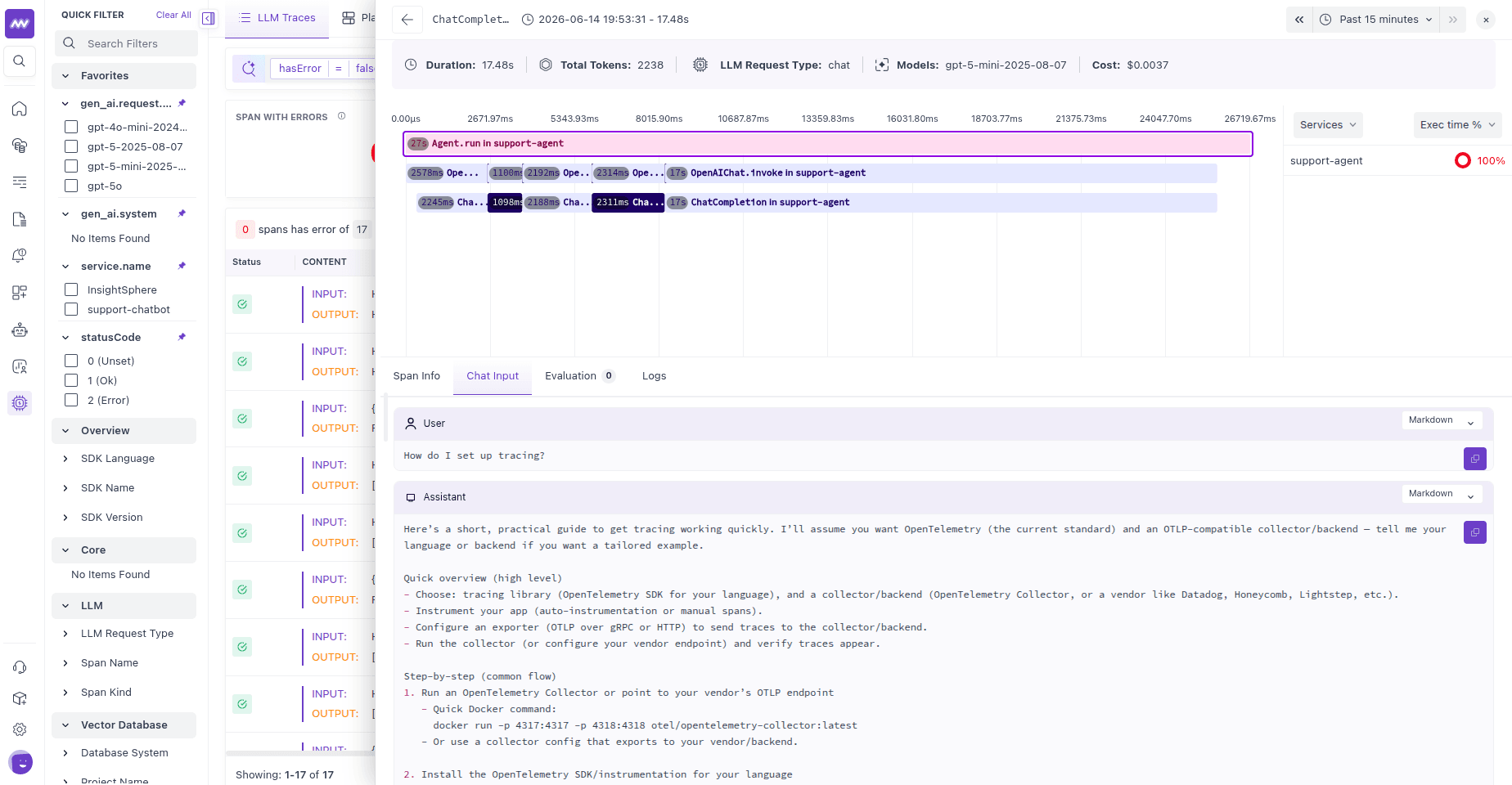
Each span shows its input, output, latency, and token usage, so you can see exactly what the agent decided, what it called, and what it returned.
Auto-instrumentation is opt-in per library: register(auto_instrument=True) only traces Agno because openinference-instrumentation-agno is installed. The same call traces any other framework whose openinference-instrumentation-* package is present, following the naming pattern openinference-instrumentation-<framework>.
2. Evaluate agent responses#
Tracing shows what the agent did. Evaluation tells you how well it performed. Create a server-side evaluator to score agent responses automatically as traces arrive, no code changes.
Create an LLM-as-a-judge evaluator#
Go to LLM Traces → Evaluation → Add Evaluator and configure:
| Field | Value |
|---|---|
| Name | agent_response_quality |
| Judge model | An OpenAI or Anthropic model |
| Prompt | Rate whether the response answered the question, was accurate, and used tools appropriately. Reference {{span.input}} and {{span.output}}. |
| Output | Score (for example 1–5) with a passing threshold, or Boolean pass/fail |
| Evaluate On | The agent's response spans |
Once published, Middleware scores matching spans as new traces arrive. See Server-side evaluations for the full setup.
Alternative: evaluate in code#
For a deterministic check, for example verifying the agent called a required tool, submit the result from your application with submit_evaluation. See Client-side evaluations.
3. Monitor and debug in production#
Once the evaluator is published, its results attach to the agent's traces and export as metrics (gen_ai.evaluations.*).
Alert on quality regressions#
Chart the agent's pass rate, average score, or failure percentage over time, and alert when it drops below your threshold.
Find failing runs#
Filter traces by evaluation result to surface the conversations that need attention:
1gen_ai.evaluation.verdict = failInspect the trace#
Open a failing run and step through its spans to find where it broke:
- Did the agent choose the wrong tool?
- Did retrieval return poor results?
- Did the model misread the tool output?
- Was the final synthesis incorrect?
Every decision is its own span, so you can pinpoint the exact step that failed.
Iterate and validate#
After updating the prompt, tools, or model:
- Deploy the change.
- Watch the evaluation scores on new traffic.
- Compare the pass rate before and after.
- Confirm the issue is resolved on real traffic.
Next steps#
- Trace and evaluate a RAG pipeline to evaluate a retrieval step in detail.
- Evaluate with an LLM-as-judge to write a quality judge in code.