PHP
| Traces | Metrics | App Logs | Custom Logs | Profiling |
|---|---|---|---|---|
| ✅ | ✅ | ✅ | ✖ | ✖ |
This guide walks you through setting up Application Performance Monitoring (APM) on a PHP application. These instructions can also be found on the Installation page in your Middleware Account. View example code here.
- CakePHP isn’t supported today.
- Current support targets Debian-based Linux distributions.
1. Prerequisites
- Middleware Host Agent (see installation guide here) running on the same machine (for host-based installs). In containers, pass
MW_AGENT_SERVICEso your app can reach the agent:- Docker:
MW_AGENT_SERVICE=172.17.0.1 - Kubernetes:
MW_AGENT_SERVICE=mw-service.mw-agent-ns.svc.cluster.local
- Docker:
- PHP: PHP version 8.0 or above. Verify with php -v.
- Composer: Ensure you have the Composer dependency manager installed to install our APM.
- PECL: PECL is required to install the appropriate extension.
2. Vanilla PHP
Install OpenTelemetry auto-instrumentation
Install the extension:
sudo pecl install channel://pecl.php.net/opentelemetry-1.0.3Enable the extension by adding to your
php.ini:[opentelemetry] extension=opentelemetry.soThe
php.inifile can be found using the following commands based on your Linux distribution:Ubuntu/Debian:
sudo nano /etc/php/<php_version>/cli/php.iniCentOS/RHEL:
sudo nano /etc/php.iniArch Linux:
sudo nano /etc/php/php.iniWeb-Serve:
sudo nano /etc/php/<php_version>/apache2/php.iniFinally, verify the installation:
php -m | grep opentelemetryInstall Middleware’s PHP package
composer update
composer require middleware/agent-apm-php
Then, add the following at the top of your entry script:
require 'vendor/autoload.php';
use Middleware\AgentApmPhp\MwTracker;
(Containers) Connectivity to the Host Agent
MW_AGENT_SERVICE=<DOCKER_BRIDGE_GATEWAY_ADDRESS>The DOCKER_BRIDGE_GATEWAY_ADDRESS is the IP address of the gateway between the Docker host and the bridge network. This is 172.17.0.1 by default. Learn more about Docker bridge networking here.
MW_AGENT_SERVICE=mw-service.mw-agent-ns.svc.cluster.localStart/stop the tracing scope + hooks
Start a tracing scope right before your main application code:
Create your tracker before your application code runs, register hooks, and close the scope:
$tracker = new MwTracker('<PROJECT-NAME>', '<SERVICE-NAME>');
$tracker->preTrack();

$tracker->registerHook('<CLASS-NAME-1>', '<FUNCTION-NAME-1>', [
  'custom.attr1' => 'value1',
  'custom.attr2' => 'value2',
]);
$tracker->registerHook('<CLASS-NAME-2>', '<FUNCTION-NAME-2>');

$tracker->postTrack();
Custom logs (optional)
To ingest custom logs, use the following functions based on desired log severity levels:
$tracker->info("Info Sample");
$tracker->warn("Warn Sample");
$tracker->debug("Debug Sample");
$tracker->error("Error Sample");
3. WordPress (zero-touch script)
Get the script (from your WP install dir, e.g., /var/www/localhost/htdocs):
curl -O https://install.middleware.io/apm/php/wp-instrument.phpYou can also download the script by clicking here.
Run (root/admin):
sudo -E MW_SERVICE_NAME=<your-service-name> php wp-instrument.phpHere:
MW_SERVICE_NAMEoptional; default isservice-<process id>.- Docker: you can pass the bridge gateway via
MW_TARGET:sudo -E MW_TARGET=<DOCKER_BRIDGE_GATEWAY_ADDRESS> php wp-instrument.php
4. Laravel
One-command installer
From your Laravel project root:
curl -O https://install.middleware.io/apm/php/laravel-instrument.php \
  && sudo php laravel-instrument.php install
(Downloads prerequisites, installs, and configures the PHP agent.)
You can also download the script manually by clicking here.
Tracing
Automatically enabled by the script.
Metrics (limited support)
Enable trace-related metrics by adding:
- Service provider in
config/app.php:'providers' => [ // ... Middleware\LaravelApm\LaravelApmServiceProvider::class, ], - Middleware in
app/Http/Kernel.php(after tracing middleware if used):protected $middleware = [ // ... \Middleware\LaravelApm\Middleware\MetricsMiddleware::class, ];
Logging
The package integrates with Laravel’s logging; configure your preferred driver, and it will forward to the Middleware automatically.
Environment
Set the following variables in your environment and restart your app to instrument your app:
OTEL_PHP_AUTOLOAD_ENABLED=true
OTEL_SERVICE_NAME=your-service-name
OTEL_EXPORTER_OTLP_ENDPOINT=http://localhost:9320
For frontend↔backend correlation:
OTEL_PROPAGATORS=baggage,tracecontext,b3multi(9320 is the local agent’s OTLP endpoint; same values are used in Forge/Beanstalk guides.)
Alternate package route: middleware/laravel-apm documents equivalent env keys (MW_SERVICE_NAME, MW_TARGET / OTEL_EXPORTER_OTLP_ENDPOINT, protocol) with defaults (e.g., http://localhost:9320).
5. Azure Pipelines
The Azure Pipelines continuous integration and continuous delivery (CI/CD) infrastructure helps you build, deploy, and test your PHP projects. For information on setting up your PHP project with Azure Pipelines and Azure DevOps Services, learn more here.
1 Configure OpenTelemetry Extension
Add the following code to your .ini file located in the /home/html/ini directory of your Azure account:
extension=opentelemetry.soThe dotnet-plugin release notes confirm .NET 6+ compatibility and the Middleware.Logger.Logger API for custom logs.
2 Add Configuration to Azure
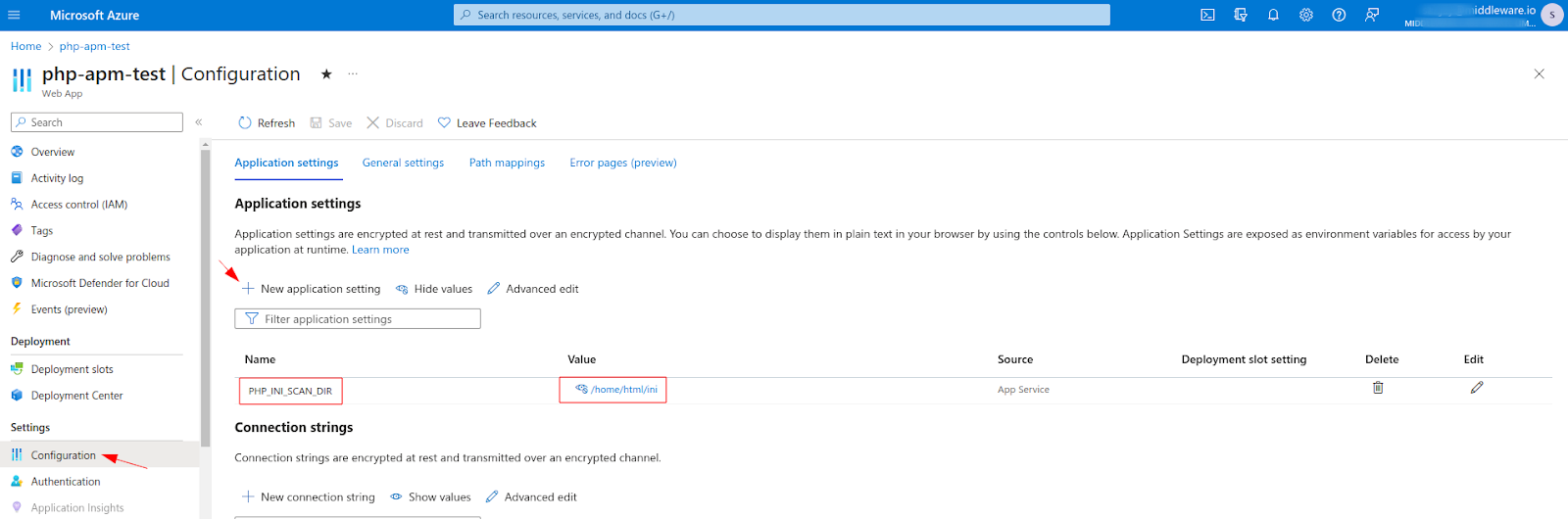
Navigate to Application Settings in your Azure PHP project account and select New application setting. Add the following Name and Value to the New application setting:
Name: PHP_INI_SCAN_DIR
Value: /home/html/ini
Your configuration should look like the following:
3 Create Your Build Pipelines
Update your build pipeline by adding the following code to the azure-pipelines.yml file:
The below build pipeline includes installation steps for Opentelemetry and the middleware/agent-apm-php
trigger:
- master

variables:
  # Azure Resource Manager connection created during pipeline creation
  azureSubscription: 'XXXXXXXXXXXXXXXXXXXX'

  # Web app name
  webAppName: 'php-apm-test'

  # Agent VM image name
  vmImageName: 'ubuntu-latest'

  # Environment name
  environmentName: 'php-apm-test'

  # Root folder under which your composer.json file is available.
  rootFolder: $(System.DefaultWorkingDirectory)

stages:
- stage: Build
  displayName: Build stage
  variables:
    phpVersion: '8.2'
  jobs:
  - job: BuildJob
    pool:
      name: Default
      vmImage: $(vmImageName)
    steps:
    - script: |
        sudo update-alternatives --set php /usr/bin/php$(phpVersion)
        sudo update-alternatives --set phar /usr/bin/phar$(phpVersion)
        sudo update-alternatives --set phpdbg /usr/bin/phpdbg$(phpVersion)
        sudo update-alternatives --set php-cgi /usr/bin/php-cgi$(phpVersion)
        sudo update-alternatives --set phar.phar /usr/bin/phar.phar$(phpVersion)
        php -version
      workingDirectory: $(rootFolder)
      displayName: 'Use PHP version $(phpVersion)'

    - script: composer install --no-interaction --prefer-dist --ignore-platform-reqs
      workingDirectory: $(rootFolder)
      displayName: 'composer install'

    - script: |
        # Check if the Opentelemetry package is already installed
        if [ "$(pecl list | grep opentelemetry)" ]; then
          echo "Opentelemetry package is already installed. Skipping this installation."
        else
          sudo pecl install channel://pecl.php.net/opentelemetry-1.0.0beta3
        fi
      workingDirectory: $(rootFolder)
      displayName: 'Install Opentelemetry Extension'

    - script: |
        # Check if the Opentelemetry package is enabled
        if php -m | grep opentelemetry; then
          echo "Opentelemetry extension is enabled."
        else
          echo "Opentelemetry extension is not enabled. Please add it to your php.ini file: extension=opentelemetry.so"
          exit 1
        fi
      workingDirectory: $(rootFolder)
      displayName: 'Verify Opentelemetry Extension'

    - script: composer update
      workingDirectory: $(rootFolder)
      displayName: 'Update Composer'

    - script: |
        # Check if the Middleware PHP APM-Package is already listed in the composer
        if composer show | grep middleware/agent-apm-php; then
          echo "Middleware APM-Package is already listed in the composer file. Skipping this installation."
        else
          composer require middleware/agent-apm-php
        fi
      workingDirectory: $(rootFolder)
      displayName: 'Install Middleware PHP APM-Package'

    - task: ArchiveFiles@2
      displayName: 'Archive files'
      inputs:
        rootFolderOrFile: '$(System.DefaultWorkingDirectory)'
        includeRootFolder: false
        archiveType: zip
        archiveFile: $(Build.ArtifactStagingDirectory)/$(Build.BuildId).zip
        replaceExistingArchive: true

    - task: PublishBuildArtifacts@1
      inputs:
        PathtoPublish: '$(Build.ArtifactStagingDirectory)'
        ArtifactName: 'drop'
        publishLocation: 'Container'
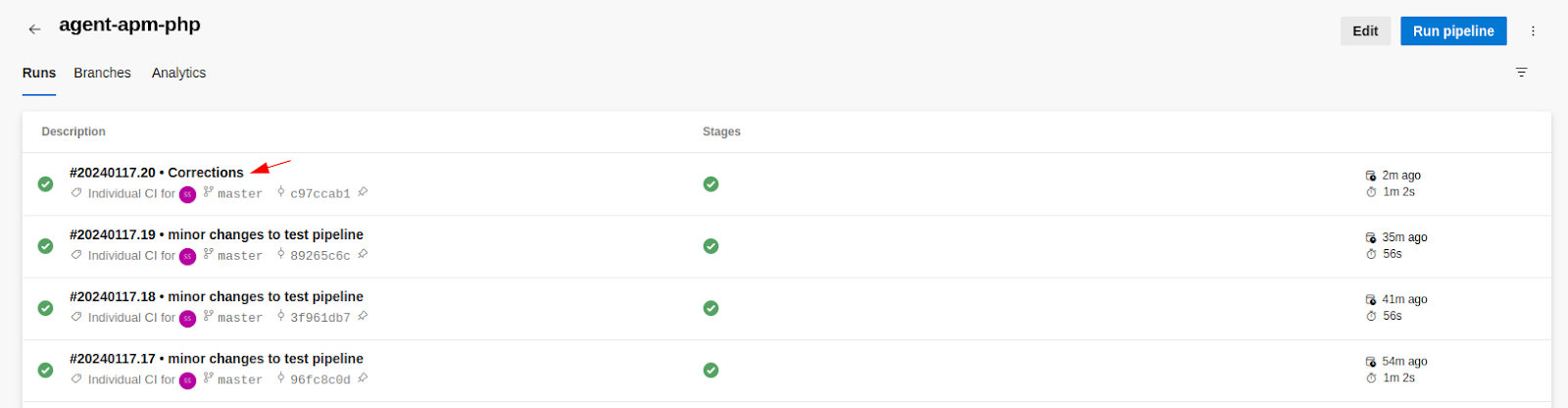
4 Check Your Pipeline
The PHP Agent is now set up to execute a CI/CD approach, following the build pipeline configuration, whenever new code is pushed to the production environment. Your output should look like the following:
6. View your data
After deployment, give it a couple of minutes and check:
- Traces (end-to-end spans, latency, errors)
- Logs (from the PHP tracker and, for Laravel, app logs)
- Continuous Profiling: not available for PHP yet (available for other APMs).
7. Environment variables
| Variable | Scope | Purpose | Example |
|---|---|---|---|
MW_AGENT_SERVICE | Docker/K8s | Address/DNS of Host Agent | 172.17.0.1 (Docker), mw-service.mw-agent-ns.svc.cluster.local (K8s) |
MW_API_KEY | WP/Laravel scripts | OTLP endpoint override (bridge gateway in Docker) | 172.17.0.1:9320 (implicitly used by scripts) |
OTEL_PHP_AUTOLOAD_ENABLED | PHP | Enables OTel PHP auto-loader | true |
OTEL_SERVICE_NAME / MW_SERVICE_NAME | PHP/Laravel | Service name shown in APM | orders-api |
OTEL_EXPORTER_OTLP_ENDPOINT / MW_TARGET | PHP/Laravel | Where to send OTLP data | http://localhost:9320 (Host Agent) |
OTEL_PROPAGATORS | PHP/Laravel | Propagation for cross-service tracing | baggage,tracecontext,b3multi |
8. Troubleshooting
Below we cover a few common errors and their solutions.
pecl: command not found error
If you receive a pecl: command not found error, run the following command:
Shell

sudo apt-get update
apt-get install php-pear php8.1-dev
Broken Dependency Issue
If you receive any broken dependency issues, including errors like libpcre2-dev : Depends: libpcre2-8-0 / libpcre2-16-0 / libpcre2-32-0, run the following command:
Shell
sudo apt --fix-broken installERROR: ‘phpize’ failed error
If you receive an ERROR: ‘phpize’ failed error, run the following commands:
Shell
sudo apt-get update
sudo apt-get install php8.1-dev

sudo apt-get update
sudo pecl channel-update pecl.php.net
Need assistance or want to learn more about Middleware? Contact our support team at [email protected] or join our Slack channel.