Understanding Aggregations
A metric arrives as many raw data points: every host, container, or process reports its own value every few seconds. Before a widget can draw a line or show a number, Middleware has to combine those points. It does this in up to three steps:
- Time aggregation combines the points of each series inside a time bucket.
- Space aggregation combines the series of different hosts or groups at each timestamp.
- Reducer (single-value widgets only) collapses the whole time range into one value.
This page walks through each step with one example, so you can predict exactly what a widget will show.
Reading a query#
The legend label of every series spells out the steps applied to it. Take this label:
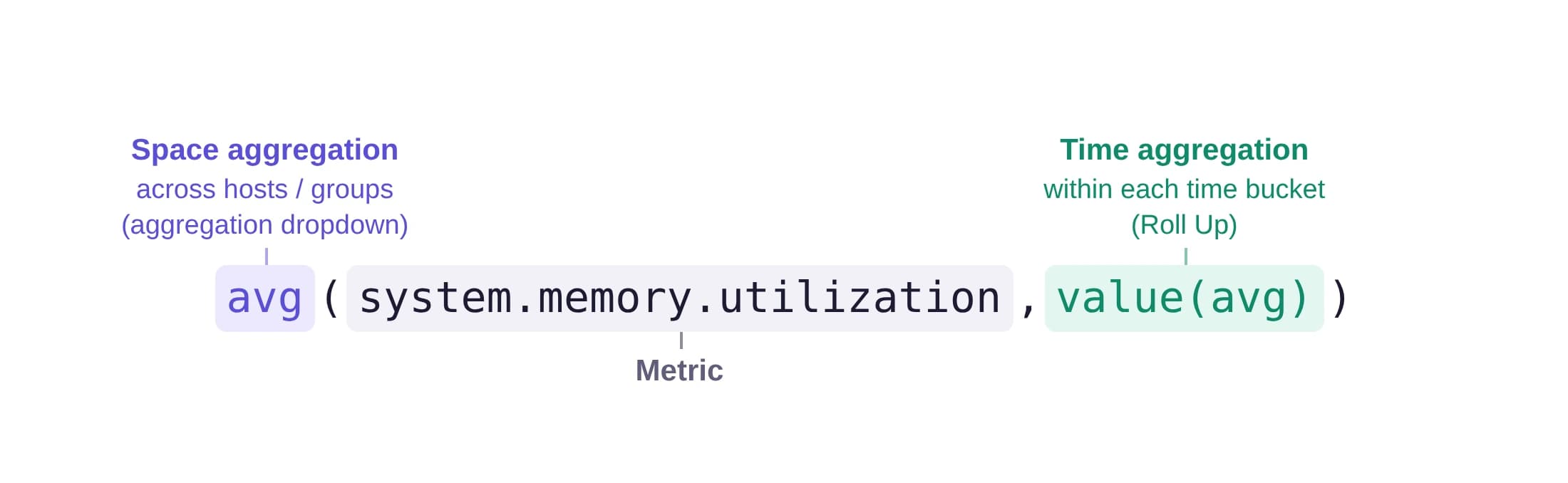
avg(system.memory.utilization,value(avg))
| Part of the label | What it does | Where you set it in the query builder |
|---|---|---|
avg(...) (outer) | Space aggregation: averages across hosts and instances, and across any additional group by. | Aggregation dropdown (avg by, sum by, and so on) |
system.memory.utilization | The metric being queried. | Metric picker |
value(avg) | Time aggregation: averages each series over each time bucket. | Roll Up under Show Advanced Options |
Other parts can appear in the label, depending on the query:
| Example label | What it means |
|---|---|
sum(http.server.requests,temporal(rate),value(max)) | temporal(rate) is a rate function, taken over the value(max) roll-up of each bucket. |
quantile(http.server.duration,level(0.95),column(buckets),temporality(2)) | A histogram percentile: level(0.95) is p95, calculated from the bucket counts. temporality(2) means cumulative and temporality(1) means delta. |
avg(http.server.duration,column(count),temporality(2)) | A histogram field other than buckets, here count. |
avg(system.memory.utilization,value(avg),reducer(max)) | On single-value widgets, reducer(max) is the Reduce values in timeframe to setting. |
any(system.memory.utilization,value(any)) | any is the last option: in the aggregation dropdown, or in Roll Up as Last. |
When you set an Alias Name, the legend shows the alias instead of this label.
The example#
The rest of this page uses the same data: 3 servers, monitored for 1 hour, each reporting system.memory.utilization every 5 minutes, with a 30-minute roll-up.
Each server reports 12 data points:
| Server | 0–30 min (6 points) | 30–60 min (6 points) |
|---|---|---|
| Server 1 | 55%, 57%, 60%, 63%, 65%, 68% | 70%, 71%, 72%, 74%, 75%, 77% |
| Server 2 | 68%, 69%, 70%, 71%, 72%, 73% | 74%, 75%, 76%, 77%, 78%, 79% |
| Server 3 | 76%, 78%, 79%, 80%, 82%, 85% | 86%, 87%, 88%, 89%, 90%, 91% |
Step 1: Time aggregation#
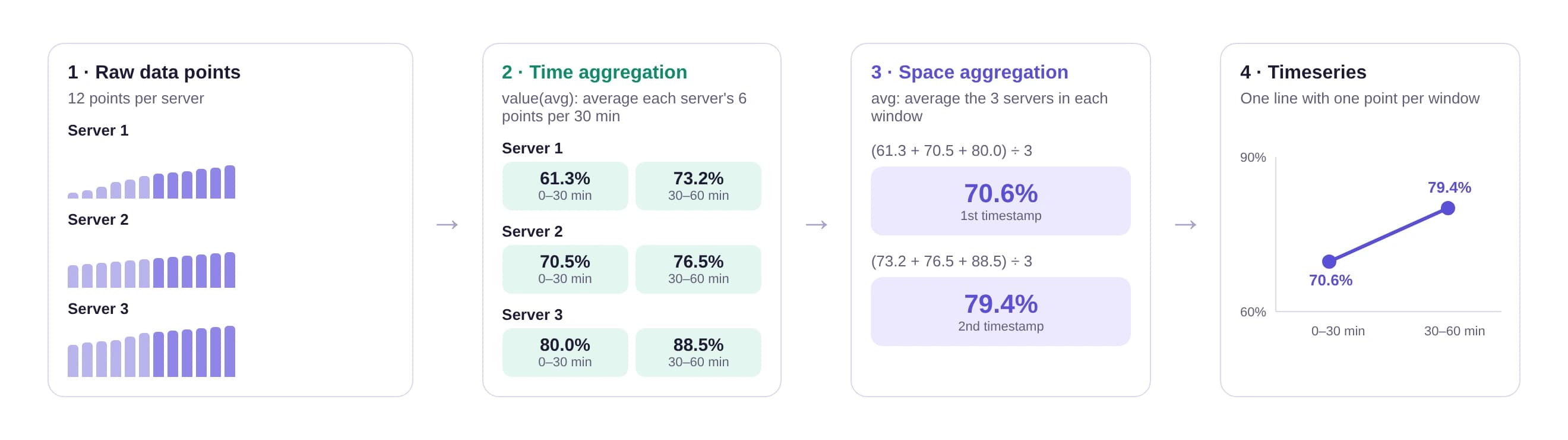
Time aggregation works on one series at a time. It splits the series into time buckets and combines the points in each bucket into one value. Here, value(avg) averages the 6 points in each 30-minute bucket:
| Server | 0–30 min | 30–60 min |
|---|---|---|
| Server 1 | (55 + 57 + 60 + 63 + 65 + 68) ÷ 6 = 61.3% | (70 + 71 + 72 + 74 + 75 + 77) ÷ 6 = 73.2% |
| Server 2 | (68 + 69 + 70 + 71 + 72 + 73) ÷ 6 = 70.5% | (74 + 75 + 76 + 77 + 78 + 79) ÷ 6 = 76.5% |
| Server 3 | (76 + 78 + 79 + 80 + 82 + 85) ÷ 6 = 80.0% | (86 + 87 + 88 + 89 + 90 + 91) ÷ 6 = 88.5% |
The bucket size comes from Roll Up … over N seconds. If you leave it on auto, Middleware picks it from the selected time range; see Roll-Up in the Dashboard builder guide. The interval for the time range is also the minimum, so a smaller value you enter is raised to it.
For longer time ranges, Middleware reads metrics that are pre-aggregated into 5-minute or 30-minute summaries instead of every raw point. For Average, each summary contributes its own average, so the result is an average of averages. As the callout at the end of this page explains, that matches the raw average only when every summary holds the same number of points.
Step 2: Space aggregation#
Space aggregation works on one timestamp at a time. It combines the values of all series that fall in the same group. With avg and no group by, the 3 servers are averaged into one series:
- First timestamp (0–30 min): (61.3% + 70.5% + 80.0%) ÷ 3 = 70.6%
- Second timestamp (30–60 min): (73.2% + 76.5% + 88.5%) ÷ 3 = 79.4%
If you add a group by such as host.name, each server stays its own series, so step 2 has nothing to combine and you get one line per server.
The other space aggregations work the same way, per timestamp: sum by adds the series, min by and max by keep the lowest or highest, and count by counts how many series reported a value. last keeps the value of one series without a defined order between series, so use it only when each group holds one series.
Timeseries result#
A Timeseries widget plots the output of step 2 directly: one line with two points, 70.6% at the first timestamp and 79.4% at the second.
The order matters. Time aggregation always runs first, per series, and space aggregation runs second, per timestamp. That is why the label reads avg(... value(avg) ...): the inner value(avg) is applied before the outer avg.
Reducers#
Widgets such as List Value show one number per group instead of a line over time. To get that number, Middleware adds a third step: the reducer, set with Reduce values in timeframe to in the query builder. It collapses all the timestamps of a series into a single value.

List Value calculation#
Using the same example, steps 1 and 2 run exactly as above and produce 70.6% and 79.4%. The reducer then combines them. With the default avg:
(70.6% + 79.4%) ÷ 2 = 75% for the whole hour
Reducer options#
| Reducer | Result for the example | Use it when you want |
|---|---|---|
| avg (default) | 75.0% | The typical value over the time range. |
| min | 70.6% | The lowest point, for example the least-loaded moment. |
| max | 79.4% | The highest point, for example peak usage. |
| last | 79.4% | The most recent value, as a "current state" readout. |
| sum | 150% | A total over the time range. Use it for counts, such as requests or errors, not for percentages or gauges. |
With a group by#
Add a group by and the reducer runs once per group. With host.name as the group by and the default avg, a List Value widget shows one row per server:
| host.name | Calculation | Value |
|---|---|---|
| Server 1 | (61.3% + 73.2%) ÷ 2 | 67.25% |
| Server 2 | (70.5% + 76.5%) ÷ 2 | 73.5% |
| Server 3 | (80.0% + 88.5%) ÷ 2 | 84.25% |
Where reducers apply#
- Shown on: List Value, Query Value, Pie Chart, Top List Chart, Tree Chart, Scatter Plot, and Hexagon Chart.
- Not shown on: Timeseries, Bar Chart, Heatmap Chart, and Split Graph, because they plot every timestamp.
- Defaults: new queries use avg. Widgets saved before the reducer existed show last, which is how their values were already calculated.
For the full list of rules, see Reduce values in timeframe to.
An average of averages only matches the average of all raw points when every bucket has the same number of points. In this example every server reports 12 points, so the overall 75% is also the average of all 36 raw values. If a host misses data in one bucket, the two can differ.
Need assistance or want to learn more about Middleware? Get in touch with us via our Contact Us or join our Slack channel.
What did you think of this content?